Skip to content
Easy Screenshot Plus
Add to Firefox
Firefox extension · Free and open source

Capture it. Mark it up. Share it.

Easy Screenshot Plus captures a selected region, the visible area, or the whole page in Firefox, then opens it in a built-in editor for arrows, boxes, text, and blur. Save it or copy it to your clipboard — nothing leaves your computer.
Add to FirefoxSee the editor
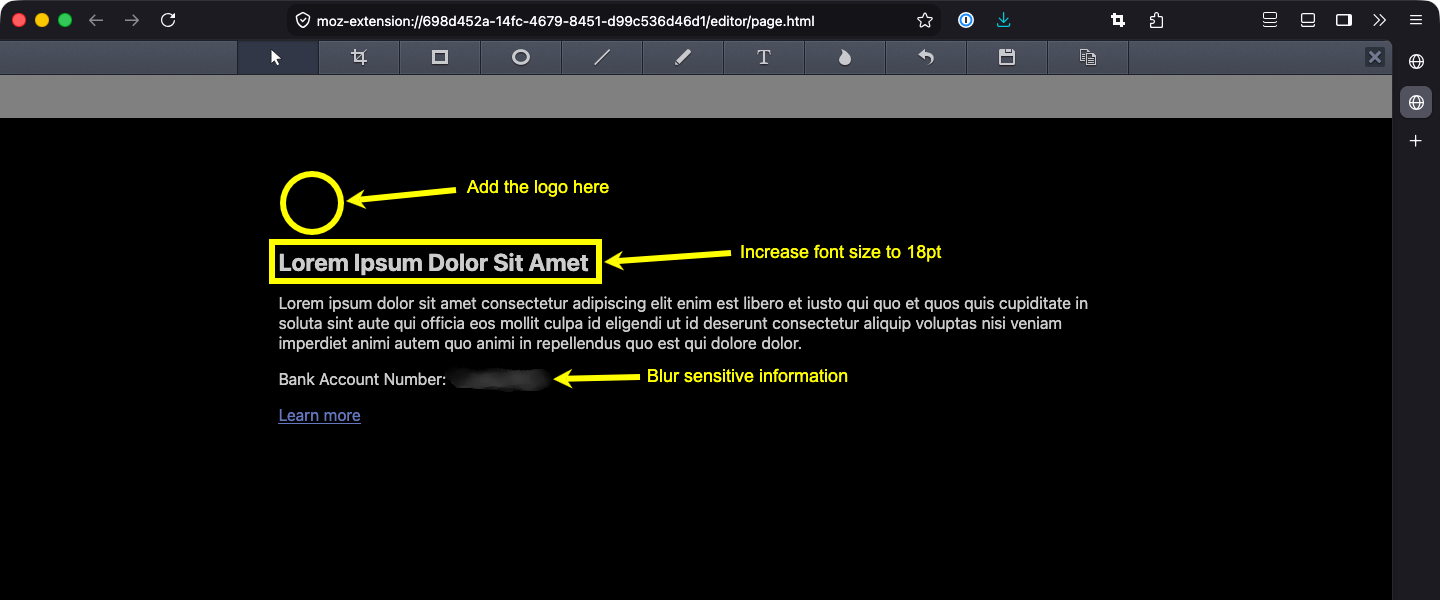
The Easy Screenshot Plus editor open in a Firefox tab. The captured page is marked up with a circle and an arrow labeled “Add the logo here”, a rectangle around the heading with an arrow labeled “Increase font size to 18pt”, and a blurred bank account number with an arrow labeled “Blur sensitive information”.

The built-in editor, opened in a new tab right after a capture.
  • Capture in one click

    Whole page, visible area, or a region you drag out. Start from the toolbar icon, a keyboard shortcut, or a modifier-click — whichever fits how you work.

  • Annotate without leaving Firefox

    The capture opens in a new tab with a real editor: rectangles, ellipses, lines and arrows, freehand, text, blur, and crop. Annotations stay editable until you save.

  • Private by design

    No account and no upload. Captures go straight from Firefox to your Downloads folder or clipboard, and the extension collects no data and has no analytics.

Capture

Three ways to grab the page

Pick a mode from the capture menu, or skip the menu: choose what a toolbar click does, give ⌘/Ctrl-click a second job, and assign Firefox keyboard shortcuts to any mode.

Whole web page
The entire page, top to bottom. Pages taller than one Firefox capture are captured in tiles and stitched together.
Visible region
Exactly what's on screen right now.
Selected region
Drag out a rectangle, move or resize it, then double-click or press Enter.

Default keyboard shortcuts

  • Show the capture menu

    Alt
    Shift
    S
  • Capture the whole page

    Ctrl
    Shift
    S

Ctrl means ⌘ on macOS. Shortcuts for the other modes — and changes to these — live in Firefox's extension shortcut manager, one click away from the extension's settings.

Editor

Mark it up, then keep editing

Every annotation is an object you can select, move, resize, restyle, or delete right up until you save. Pick a color from the palette, choose a line width, and put arrowheads on either end of a line.

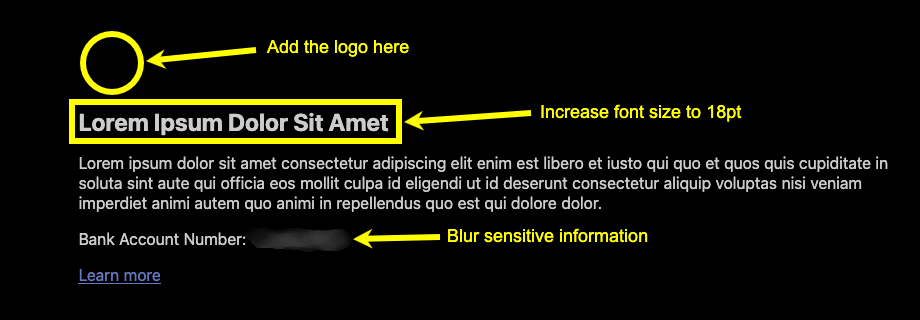
Close-up of annotations drawn in the editor: a circle, arrows with text labels, a rectangle outlining a heading, and a blurred bank account number.
  • V

    Select

    Move, resize, restyle, or delete an annotation

  • X

    Crop

    Trim the capture

  • R

    Rectangle

    Outline a region

  • E

    Ellipse

    Circle something

  • D

    Line

    With arrowheads on one end, both, or neither

  • F

    Pencil

    Freehand strokes

  • T

    Text

    Labels in twelve sizes

  • B

    Blur

    Hide anything sensitive

  • Z

    Undo

    Step back

  • S

    Save

    PNG to your Downloads folder

  • C

    Copy

    PNG to your clipboard

  • Q

    Close

    Discard and close the tab

  • Three line widths and twelve text sizes

  • A 70-color palette, remembered between captures

  • Escape returns to the Select tool; Delete removes the selected annotation

Privacy

Your screenshots stay on your computer

Easy Screenshot Plus has no server and no account. This is what it actually does with your data, checked against the source code.

Read the privacy policy
  • Captures are held in memory and handed to the editor tab. They're written to disk only when you click Save, and to the clipboard only when you click Copy.

  • Your settings live in Firefox's local extension storage on this device.

  • No analytics, no telemetry, no crash reporting, and no third-party services. The extension doesn't send anything anywhere.

  • The add-on declares to Firefox that it requires no data collection.

  • Open source under the MPL-2.0 license, so you can read the code.

Add it to Firefox and take your next screenshot

Free and open source. Requires Firefox 137 or later on desktop.

Add to FirefoxView on GitHub
Easy Screenshot Plus

Screenshot capture and annotation for Firefox.

Made with 🧘 by Quiet Mind Creative

A community-maintained fork of Easy Screenshot. Not affiliated with Mozilla or Firefox.